Hardly ever does a technology reshape an entire business function as quickly as AI is reshaping CRM.
The original premise was simple: log the customer, track the deal, pull the report. The sales rep remembered to update it. The manager knew what questions to ask. The data sat there until someone went looking. AI changes that direction: the CRM stops waiting and starts working. Scoring leads before a rep opens the account. Flagging churn risk before anyone notices the signs. By 2029, agentic AI is expected to autonomously resolve 80% of common customer service issues, with a projected 30% drop in operational costs, according to Capgemini’s AI in Business Operations report.
Most companies aren’t there yet. This guide covers what AI integration in CRM actually looks like: the types being used, the use cases that move the needle, and where implementations break down. The strategies here draw from 20+ years of enterprise software delivery and service contracts that run a decade or longer. That’s the experience Acropolium brings to every AI integration engagement.
The Rise of AI in CRM Systems
CRM platforms have always collected more data than the teams using them could act on. Contact histories, deal stages, support tickets, email threads, call logs - it was all there. Early AI features in CRM were narrow: a recommended next action here, a lead score there. What changed was several AI disciplines maturing at the same time and becoming practical enough to embed into the systems sales, marketing, and service teams use every day.
Five directions are currently doing the most work.
Predictive analytics and machine learning sit at the foundation. Models trained on historical CRM data identify which leads are likely to convert, which customers are drifting toward churn, and which deals are quietly going sideways before anyone flags them. They also get better over time. The longer a model runs inside a CRM, the more accurate its outputs become, because it keeps learning from what happens next.
Natural language processing handles the unstructured layer. Most of what happens in a customer relationship is text that traditional CRM systems store but can’t interpret. NLP reads sentiment, extracts intent, summarizes conversations, and routes cases based on what a customer actually said. Customer data stops being a filing system and starts being a signal.
Generative AI sits atop both. Predictive models tell you what’s likely to happen. NLP tells you what customers are actually saying. Generative AI produces responses such as a personalized follow-up, a drafted proposal, or a suggested reply to an open ticket. Organizations using AI for proposal generation have cut turnaround from roughly a week and a half to one or two days, saving teams 20 to 30 hours per engagement, according to Capgemini.
Agentic AI removes the human from the loop for defined task categories. An AI agent inside a CRM monitors deal activity, detects overdue follow-ups, updates records from meeting transcripts, escalates cases that match a risk profile, and runs multi-step workflows without manual input at each stage.
Conversational AI and chatbots operate at the customer-facing end of the same stack. CRM-integrated bots now qualify leads, book meetings, collect structured data during support interactions, and hand off to human agents with full context already prepared. 56% of consumers rank AI-integrated bots among their top three preferred interaction channels.
What makes the current moment different from earlier waves of CRM automation is that these five capabilities are working together. For example, the customer sends a support message. NLP reads the sentiment and classifies the issue. Predictive analytics flags a 70% churn probability for that account. Generative AI drafts a response. An agent escalates to a human rep with full context loaded. That sequence, which would have required four separate tools and manual handoffs two years ago, can now run inside a single CRM workflow.
How to Use AI in CRM: Types of AI Integrations in CRM Systems
Conversational AI and Virtual Assistants
Forty-six percent of organizations already have conversational systems integrated with their CRM, which makes this the entry point for most AI-in-CRM programs. At the basic end, chatbot development enables handling of routine support queries, FAQs, order tracking, and simple transactions. At the more sophisticated end, it means natively embedded assistants that live inside the CRM and help reps draft emails, summarize calls, pull account context, and coordinate responses to open disputes.
The direction this is heading is worth noting. “Zero UI” interfaces involve voice-driven or intent-based interactions in which customers delegate tasks directly to an AI without navigating screens. Buenos Aires’ AI assistant Boti already handles over 2 million queries per month without human intervention, cutting the city’s operational burden by 50%.
Generative AI for Productivity
Where conversational AI faces the customer, generative AI mostly works behind the scenes. It reduces the manual overhead that accumulates on every sales and service interaction.
Call summarization is the clearest example: instead of a rep spending 10 minutes after each call updating the CRM, a generative model reads the transcript and writes the summary. At scale, across a team of 50 reps running 8 calls a day, that compounds fast.
The more commercially significant application is hyper-personalized outreach. Generative AI development services analyze account history, past engagement patterns, and deal stage to draft follow-up emails and proposals. Sales enablement is another active area. Those models act as co-pilots during live calls, surfacing relevant case studies, suggesting pricing options, or flagging objection patterns in real time.
Agentic AI and Multi-Agent Systems
There’s a meaningful difference between automation and agency. A chatbot follows a script. A generative model produces output when prompted. Here’s what separates agentic AI from both:
It doesn’t wait for a trigger.
It reasons across incomplete information.
It executes multi-step workflows spanning multiple systems.
It hands off to other agents or humans when the situation requires it.
Inside a CRM context, AI agents development means an agent can monitor deal activity, detect a stalled opportunity, pull the relevant account history, draft an outreach message, schedule a follow-up, and update the pipeline record. More advanced deployments are among the future of AI in CRM, involving multi-agent systems: a delivery agent communicates with a CRM agent to resolve a fulfillment issue and propose a remedy to the customer, without a rep involved. Organizations are also using agents for back-office CRM work that’s too complex to script but too repetitive to justify human time.
Predictive Analytics and ML Models
Predictive analytics is the oldest layer of AI in CRM and still among the most valuable.
Lead scoring is the canonical use case: ML models trained on historical win/loss data rank inbound leads by their conversion probability, allowing sales teams to prioritize without relying on gut feel or tenure. Pipeline forecasting works similarly: models examine opportunity data across the funnel, identify patterns in deal velocity and stage progression, and surface a probability-weighted revenue forecast that updates as conditions change.
Churn prediction is where predictive analytics earns its keep in customer success programs. By analyzing behavioral signals, machine learning development can flag at-risk accounts weeks before a human would notice. That lead time is what allows proactive outreach to reach customers before they decide to leave.
Data Orchestration
Generative AI, agentic AI, and predictive models are only as good as the data they run on. Yet 78% of front-line staff lack real-time access to customer data, and only 18% of organizations have reached a high level of data readiness maturity. AI-driven data orchestration addresses this by pulling data from web, mobile, in-store, and third-party touchpoints into a unified customer profile and keeping it up to date. 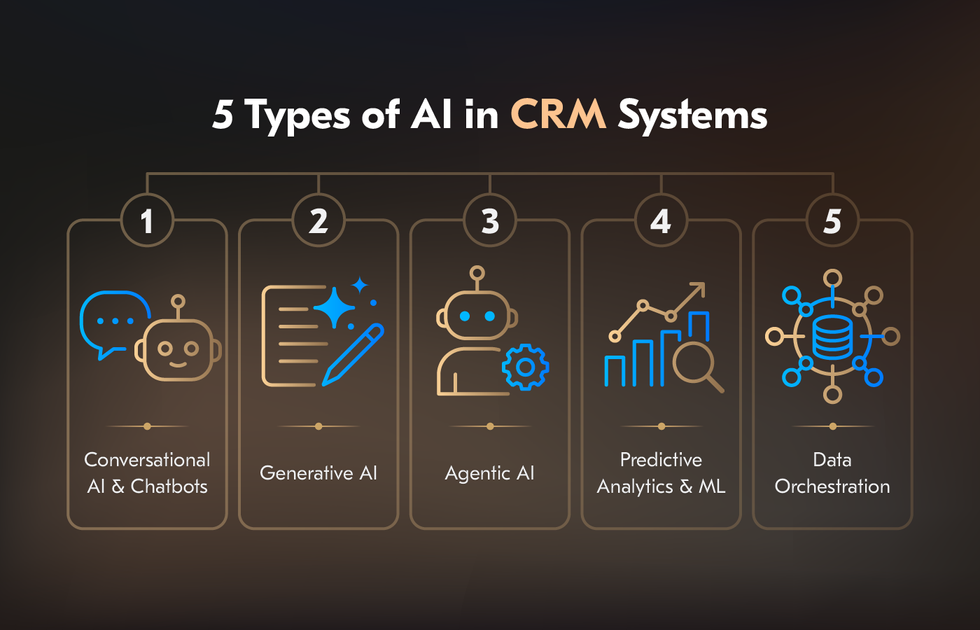
How Does AI Enhance CRM Systems?
More interactions, more touchpoints, more signals than any team can meaningfully process. AI doesn’t solve that by summarizing the data. Answering the question: how does AI improve CRM? It can act on the data directly, at a speed and consistency no human workflow can match.
Hyper-Personalization
Sixty-six percent of organizations report using customer data to personalize experiences across channels. Yet 61% of customers say they still don’t receive a superior experience, and 52% say companies fail to use their personal data in any way that delivers real value. AI models pull from the full account history, such as purchase behavior, support interactions, email engagement, product usage, deal stage, and generate outreach that reflects where that specific customer actually is.
The commercial impact shows up in pipeline metrics. When generative AI drafts proposals calibrated to individual account context, turnaround drops from a week and a half to one or two days. Personalization at scale is a revenue operations lever.
Smarter Lead Scoring
Traditional lead scoring assigned points based on demographic fit and basic behavioral triggers: job title, company size, downloaded a whitepaper, and visited the pricing page. ML-powered lead scoring trains on historical win/loss data. It could be thousands of closed deals with all their associated signals for learning which combinations of factors actually correlate with conversion in a specific business context.
Pipeline automation extends this further. AI monitors deal progression, detects when opportunities have gone quiet, identifies deals at risk based on activity patterns, and triggers follow-up sequences without waiting for a rep to notice.
Proactive Customer Service
AI can detect signals that indicate a problem is forming and act before the customer reaches out. Inside a CRM, that means monitoring product usage for patterns that precede support tickets, identifying customers who haven’t engaged with a key feature and are likely to struggle at renewal, or flagging accounts where billing anomalies suggest friction is building. When intervention happens at that stage, resolution is faster, and the customer experience is materially better.
Case routing is where AI handles the triage layer. Rather than sending every inbound ticket to a queue for manual categorization, NLP reads the case content, classifies issue type and urgency, and routes directly to the right team. The cases that reach human agents are the ones that actually require human judgment.
Real-Time Sentiment Analysis
Most CRM data is structured: deal stages, contact records, pipeline values. What it historically couldn’t capture was tone. NLP-powered sentiment analysis tracks emotional shifts during live calls and scores written interactions in real time. It flags accounts where the relationship is deteriorating before it shows up in renewal conversations.
When sentiment data feeds into churn models, predictive accuracy improves. Behavioral signals tell you what a customer is doing. Sentiment tells you how they feel about it. Combined, the two produce a more complete picture of account health than either delivers alone.
Automated Data Management
Bad CRM data is expensive in ways that compound quietly. A churn model trained on incomplete histories produces unreliable scores. Or a personalization engine, drawing on stale behavioral data, generates irrelevant outreach. Artificial Intelligence in CRM automates the maintenance layer that human teams can’t keep up with at scale:
Duplicate detection runs continuously, merging records that represent the same contact or account.
Data enrichment pulls from external sources to fill gaps in company size, industry, technology stack, and recent funding.
Activity logging captures interactions from email, calendar, and call systems and automatically writes them to the CRM. It makes the record reflect what actually happened.
Real-World Use Cases of AI in CRM systems by Industry
Theory is easy. The more useful question is what happens when companies actually wire AI into their customer operations. Here’s what the AI applications in CRM look like across six industries.
Retail: From Browse to Buy Without the Friction
Retailers aren’t just adding AI features. They’re collapsing the gap between product discovery and completed purchase.
Walmart now runs AI shopping agents that handle product discovery, cart management, and automated reordering of household essentials.
Amazon’s “Buy for Me” agent goes further: it visits third-party websites, selects items, and completes checkout on the customer’s behalf without the customer ever leaving the Amazon interface.
Carrefour reports that 60% of its consumers already use AI at some point in their shopping journey.
H&M deployed an AI-powered HR agent that cut time-to-hire by 43% and reduced employee attrition by 25%.
Financial Services: High-Stakes Decisions at Scale
Financial institutions have a harder constraint than most. Every AI decision touches either money or compliance. Capital One deployed a concierge AI agent for car-dealership clients that provides vehicle information and books test drives without a human in the loop. Kuwait Finance House went further, introducing “Fahad”. It is a hyper-realistic AI avatar at physical kiosks that guides customers through transactions in real time.
On the compliance side, SafeGuard Financial achieved a 75% improvement in regulatory breach detection through AI-driven predictive monitoring. Wells Fargo used interacting AI agents in CRM to re-underwrite 15 years of archived loan documents. That’s the kind of work that would have taken an entire compliance team years to touch manually.
Telecom: Personalization at Network Scale
Telecom companies manage millions of customer relationships simultaneously, which makes them an early proving ground for AI at scale. Telstra was integrating generative AI directly into front-line workflows via CRM systems. Ninety percent of employees reported significant time savings during customer interactions.
SK Telecom’s AI agent “Aster” operates at the customer-facing end, anticipating user needs like managing schedules, shopping lists, and context from previous interactions, without waiting to be asked. Some providers have moved to “next best experience” engines that identify when a customer needs help or a better offer and deliver a personalized message automatically, before a complaint is ever filed.
Healthcare: Less Admin, More Patient Time
In healthcare, the CRM problem is the documentation. Physicians spend a disproportionate share of their working day on visit notes, referrals, and administrative records.
At Bayer’s crop science R&D division, AI agents save employees up to six hours per week on the coordination and reporting overhead that surrounds it. Healthcare providers are also using AI to build “Patient 360” data products: unified profiles that pull disease trend analysis, treatment history, and engagement data into a single view for care teams.
Manufacturing and Automotive: From Assembly Line to Customer Experience
Mercedes-Benz integrated Google Cloud’s Automotive AI Agent into its MBUX Virtual Assistant, giving drivers multimodal, multilingual natural language interactions. The CRM layer isn’t the car. It’s the relationship between the driver and every service touchpoint after purchase.
Panasonic Energy trained a virtual assistant on over one million maintenance tickets. The result was reduced downtime, faster technician onboarding, and a support operation that improves with every case it handles.
| Industry | Company | AI Application | Result |
|---|---|---|---|
| Retail | H&M | AI-powered HR agent | 43% faster time-to-hire, 25% less attrition |
| Financial Services | SafeGuard Financial | Predictive compliance monitoring | 75% improvement in breach detection |
| Telecom | Telstra | Generative AI for front-line staff | 90% of employees reported time savings |
| Healthcare | Bayer | AI agents for R&D coordination | 6 hours saved per employee per week |
| Manufacturing | Panasonic Energy | Virtual assistant trained on 1M+ tickets | Reduced downtime, faster onboarding |
Every example above started with the same decision: finding a partner who understood both the technology and the business context around it. Acropolium has spent 20+ years delivering enterprise software across the industries covered here. If you’re evaluating what AI integration looks like for your CRM specifically, that’s the conversation to start.
How to Integrate AI with CRM Systems
Most AI-in-CRM projects fail because the integration decision was made before anyone properly defined what problem it was solving. The starting point for the integration is an honest assessment of where your CRM data lives, how clean it is, what your teams actually need from AI, and whether your current platform can support it without significant rework.
Step 1: Audit Your CRM Data
AI models are only as good as the data they run on. Before evaluating any CRM and AI integration, map what you have: which systems feed your CRM, how complete your contact and activity records are, where duplicates accumulate, and how much of your customer interaction history is structured versus buried in free-text fields.
Step 2: Define the Use Cases
Not every AI capability belongs in every CRM. A company with a 10-person sales team and a 3-week sales cycle has different priorities than an enterprise running global customer service operations across five product lines.
Narrow the focus to two or three use cases with measurable outcomes: lead scoring accuracy, first-response time, proposal turnaround, churn detection lead time. Specific targets make vendor evaluation easier and give you a baseline against which to measure results.
Step 3: Choose Between Off-the-Shelf and Custom AI Integration
This is where most integration decisions get made correctly or incorrectly, and the answer depends almost entirely on your use case, your data environment, and how differentiated your customer operations need to be.
Off-the-shelf AI (the native AI features built into Salesforce, HubSpot, Microsoft Dynamics, or added via marketplace integrations) covers most standard use cases well. Lead scoring, email generation, call summarization, and basic sentiment analysis. If your CRM processes are relatively standard and your data is reasonably clean, these tools get you to value fast with minimal engineering overhead. The ceiling shows up quickly in three situations:
Your customer data is spread across systems that don’t natively connect to your CRM.
Your sales or service processes are complex enough that generic models produce inaccurate outputs.
You need AI that learns from your specific business context.
Custom AI integration addresses those gaps. It means building models trained on your own historical data, designing agent workflows around your actual processes, and integrating AI with CRM systems the full data environment. The tradeoff is time, cost, and the need for a partner who can execute at that level.
Acropolium works with companies for whom off-the-shelf is the wrong answer. That tends to be enterprises with complex data environments, long customer relationships with significant interaction history, or compliance requirements that generic AI tools aren’t built to handle. The work isn’t selling a platform. It’s designing the integration from the data layer up, then building it in a way that the internal team can own and extend after delivery.
Step 4: Plan the Integration Architecture
Whether you’re extending an existing CRM or building custom AI pipelines alongside it, the integration architecture determines what’s possible later. Key decisions at this stage:
Which data sources feed the AI layer, and how they stay synchronized?
Whether AI outputs write back to the CRM automatically or require human review?
How agent workflows hand off to human reps, and what context transfers with them?
Where model outputs get logged for auditing and retraining?
Skipping architectural planning in favor of a fast deployment is the second most common reason integrations stall. The first is bad data.
Step 5: Run a Contained Pilot Before Scaling
Pick one use case, one team, and a defined time window. Measure against the baseline you established in Step 2. A pilot done this way tells you three things before you commit further budget: whether the AI outputs are accurate enough to act on, whether the team will actually use the system, and where the data gaps are that weren’t visible in the audit.
Scale what works. Fix what doesn’t before expanding the scope. 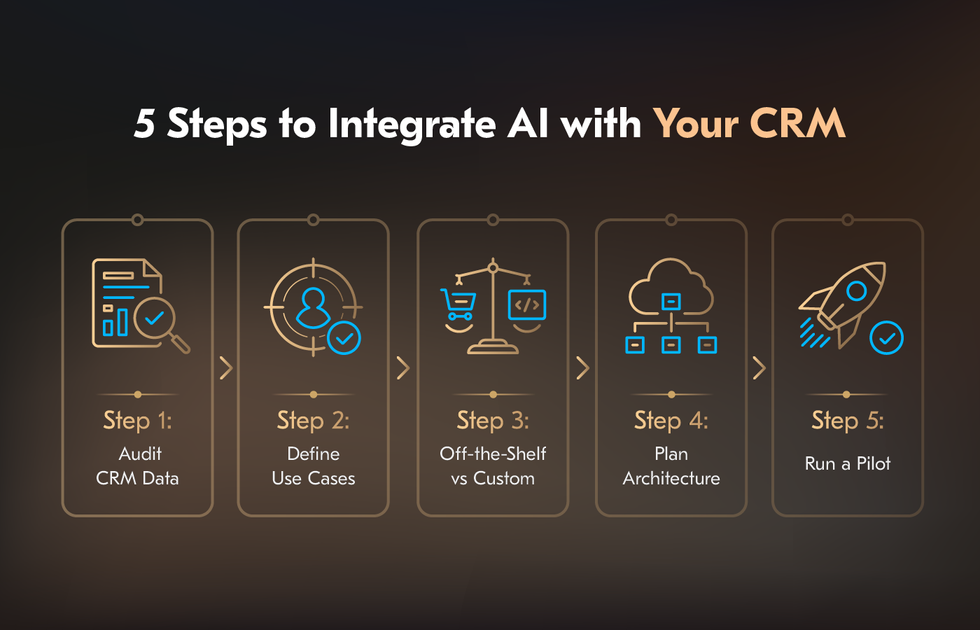
Challenges of Integrating AI Into CRM Systems and Acropolium’s Strategies to Mitigate Them
Here are the five challenges that most often derail integrations, and what it takes to get past them.
1. Data Fragmentation
This is the root cause of most AI failures in CRM, even when they’re blamed on something else. Duplicate records, incomplete contact histories, interaction data sitting in disconnected systems, free-text fields that no model can reliably parse – any of these degrade AI output quality.
We build continuous data governance into the integration architecture from the start: automated deduplication, enrichment pipelines, clear rules for what writes back to the CRM, and when. Acropolium treats data readiness as a precondition. If the data environment isn’t ready, the integration timeline moves.
2. High Implementation Cost
Enterprise AI integration is expensive, and the costs that get underestimated are rarely the obvious ones. The way to manage cost isn’t to find a cheaper vendor. It’s important to scope correctly before committing. Acropolium structures engagements this way deliberately. A client who scales slowly on a working integration spends less than one who fully commits to an integration that needs rebuilding.
3. Security, Privacy, and Regulatory Compliance
CRM systems hold some of the most sensitive data in an enterprise: customer identities, financial histories, health records, and communication logs. AI integration expands the attack surface and introduces new questions about data residency, model training data, and audit trails. These questions most off-the-shelf tools aren’t designed to address.
For companies in financial services, healthcare, or the public sector, compliance isn’t a checklist item at the end of an integration project. Acropolium has worked in regulated environments long enough to know that retrofitting compliance into a completed integration is significantly more expensive than designing for it up front.
4. Over-Reliance on AI and Loss of Human Touch
AI in CRM improves with scale and consistency. It scores every lead the same way, flags every at-risk account by the same criteria, and generates follow-ups on the same cadence. A long-standing enterprise relationship that’s going through an unusual quarter doesn’t always appear to be a churn risk in a model. The integrations that work well maintain a clear boundary between what AI decides autonomously and what it surfaces for human judgment.
5. Change Management and User Adoption
This is the challenge that gets the least attention in technical planning and causes the most project failures in practice. An Artificial Intelligence in CRM integration that the sales team doesn’t trust, doesn’t understand, or finds harder to use than the previous workflow will not get used, regardless of how well it was built.
Adoption happens when people see the system make their jobs easier in ways they can directly observe. Acropolium embeds adoption planning into the delivery process. The measure of a successful integration isn’t go-live. It’s the usage rate six months later.
How Acropolium Helps Integrate AI into CRM
Most AI integration projects don’t fail on the technology. They fail on the gap between a working demo and a system that holds up against real data, real processes, and real compliance requirements. That’s the gap we’ve spent 20+ years learning to close.
Acropolium delivers enterprise software for companies in financial services, healthcare, manufacturing, and the public sector. We start every engagement with a data audit. That audit tells us what your AI will actually run on, where the gaps are, and what the integration will realistically cost before anyone commits to building it.
We build from the ground up: custom scoring models trained on your data. Agent workflows are designed around your actual processes. Integrations your team can own, maintain, and extend long after we’re done. The measure we hold ourselves to is whether the system is still running, still improving, and still being used a year later.
If you’re past evaluating whether AI belongs in your CRM and have moved on to figuring out how to do it correctly, that’s the conversation we’re built for.




![AI in Automotive Industry: [9 Use Cases + Examples]](/img/articles/ai-in-automotive-industry/img01.jpg)

![How to Integrate AI into Your Business: [A Comprehensive Guide]](/img/articles/how-to-integrate-ai-into-your-business-a-comprehensive-guide/img01.jpg)