Most CRMs were designed with traditional sales and marketing pipelines in mind, where each contact is a potential lead and a closed deal ends the story. Healthcare teams enter very different information into those same fields, like the reason for a visit, a referral from a cardiologist, an insurance plan, or a note that a patient missed two follow-ups.
Once that information enters the CRM, the platform now holds protected health information (PHI), and HIPAA requires a signed business associate agreement (BAA) between you and the vendor.
This guide explains how a healthcare CRM works with your electronic health record (EHR), which features matter most for daily use, what to check before patient data goes in, and how to choose between configuring an existing product and building your own custom CRM with Acropolium.
What Is CRM in Healthcare (and How It Differs from EHR)
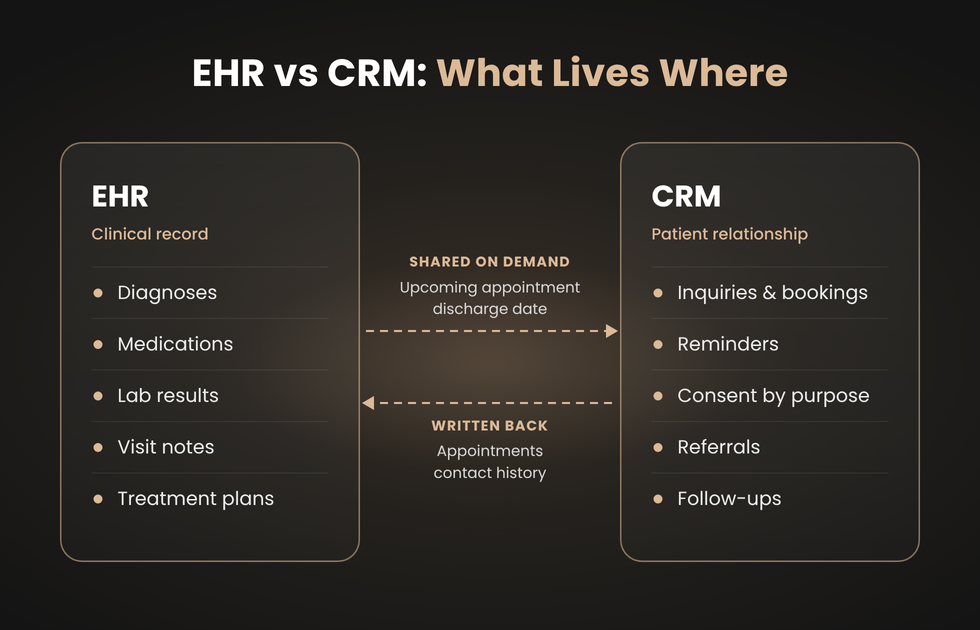
A healthcare CRM manages a patient’s full interaction with a provider outside the exam room, covering the first inquiry, booking, reminders, referrals, follow-up after discharge, and feedback. The EHR remains the clinical record of diagnoses, medications, lab results, and visit notes.
In practice, the EHR owns clinical truth and the CRM owns communication, meaning who was contacted, through which channel, under what consent, and what happened next. A well-designed CRM reads only the clinical fields that outreach requires, such as an upcoming appointment or a discharge date, and writes any appointments and contact history back to the EHR.
Teams that are considering custom EHR software development should ideally design both data models together, so the two systems share the same patient identifiers. Certified EHRs already expose FHIR-based APIs for patient data, so a CRM for healthcare built on those APIs can can pull current patient records straight from the source.
Healthcare CRM vs General CRM: Key Differences
| Area | General CRM | Healthcare CRM |
|---|---|---|
| Core record | Lead, contact, and account | Patient, linked caregivers or guardians, and referring providers |
| Data held | Contact details and deal history | PHI covered by HIPAA, sometimes records with stricter federal rules |
| Consent | One marketing opt-in | Separate consent per purpose and channel, with a dated history |
| Key integrations | Email, calendar, and sales tools | EHR, practice management, billing, and telehealth, often over FHIR |
| Success metrics | Pipeline and win rate | No-shows, referral leakage, recall completion, and patient retention |
The CRM meaning in healthcare is broader than in sales, but that doesn’t make all-purpose CRMs unfit for the job. For reference, Salesforce sells a dedicated Health Cloud, and HubSpot signs a business associate agreement for its sensitive data features. Whether the vendor’s agreement covers every feature you need is the first real test, and the HIPAA checklist below shows exactly how to run it, but workflow fit and integrations will decide the rest.
Healthcare CRM Use Cases for Clinics, Hospitals, and Telehealth Providers
Before comparing healthcare CRM systems, pin down who will use the platform day to day and which systems it has to connect to, since both change a lot between clinics, hospitals, and telehealth providers.
Clinics and Multi-Location Practices
For a clinic, a CRM earns its place at the front desk. Online booking, automated reminders, and a waitlist that offers a canceled slot to the next suitable patient attack no-shows directly, which is usually the first number a practice manager wants to improve. Groups with several locations also use it to schedule across sites, run recall programs for annual checkups or hygiene visits, and route reviews and complaints to the right manager. A good CRM for healthcare clinics syncs bookings with the clinic’s practice management system, the software that usually handles scheduling and billing, so nobody has to enter any records twice.
Hospitals and Health Systems
In a hospital, the CRM usually sits behind the call center and the referral team. Agents need the caller’s recent interactions, upcoming appointments, and open referrals on one screen, while service lines run screening and new-clinic campaigns that have to respect each patient’s consent. If your hospital runs Epic, check its own CRM module, Cheers, before buying anything else, since it works directly on the Epic record. A separate CRM for hospitals pays off when workflows reach beyond what the EHR vendor covers, such as physician liaison programs, affiliated practices on other systems, or employer and payer partnerships.
Telehealth and Digital Health Providers
For virtual care providers, the CRM often carries most of the patient interactions, because there’s no front desk or waiting room. They manage patients across several states, asynchronous messaging, subscription programs, and pharmacy or lab partners, and each of those flows touches health data. Providers covered by HIPAA follow its rules, while most health apps outside HIPAA fall under the FTC’s Health Breach Notification Rule, which was updated in 2024 to make that even more explicit. Know which rule applies before choosing a CRM for healthcare providers in this space, because it decides how you handle breaches and share patient data with partners.
Healthcare CRM Features That Matter
These are the healthcare CRM software features worth checking in every vendor demo or requesting in a custom build, along with what a good version of each one looks like.
1. Patient Profile Linked to the EHR
The profile should show demographics, preferences, caregivers, appointments, and communication history, with clinical context pulled directly from the EHR when someone needs it. Copying clinical notes into the CRM creates two versions of the truth and doubles the data you have to protect, and leaves more room for error with such sensitive data. Also, linking each profile to the patient’s EHR ID, usually the medical record number, prevents two people with the same name from having their records mixed up.
2. Scheduling, Reminders, and Waitlists
Two-way calendar sync with the practice management system or EHR is the baseline. Reminders should go out through the channel each patient chose and let them confirm, cancel, or reschedule in one step, because a slot freed the day before can still be filled. Waitlist automation that offers those slots to matched patients is what turns cancellations back into booked visits.
3. Consent and Communication Preferences
Consent should be stored per purpose and per channel, with the date, the source, and the wording the patient agreed to. A patient can welcome appointment texts and still refuse marketing email, and HIPAA treats those two messages very differently. The CRM has to check that record automatically before every send, instead of leaving it to whoever builds each new campaign.
4. Role-Based Access and Audit Trail
A scheduler, a nurse navigator, and a marketing analyst may need different views of the same patient. Access should follow HIPAA’s minimum necessary standard, with field-level restrictions on diagnoses and notes, and every view, edit, and export should land in an audit log you can search. Without that log, investigating a complaint or a breach becomes a real challenge.
5. Referral and Intake Workflows
Referrals are where health systems lose patients without noticing, because nobody owns the handoff between the referring office and the first appointment. The CRM should track each referral from receipt to a scheduled visit, flag the ones that stall, and send digital intake forms whose answers land in structured fields. Referral leakage then becomes a number you can report on every month and work to improve over time.
6. Reporting Without PHI Exports
Managers need numbers like no-show rates, referral conversions, and campaign results, and none of them require patient names or diagnoses. With those totals built into the CRM’s dashboards, nobody exports a patient list to Excel to calculate them, and the data stays inside the system your BAA covers. On top of that, check that the reporting tools themselves are covered too, because some vendors leave their analytics and AI features out of the agreement.
HIPAA-Compliant CRM for Healthcare: What to Check
No CRM is HIPAA-compliant out of the box, whatever the product page says. Compliance comes from a business associate agreement that covers the features you use, a configuration that keeps PHI inside them, and staff habits that don’t route data around them. Breaches are also on the rise, and HIPAA Journal’s analysis reported 806 large healthcare data breaches in 2025, up 8.6% from 2024.
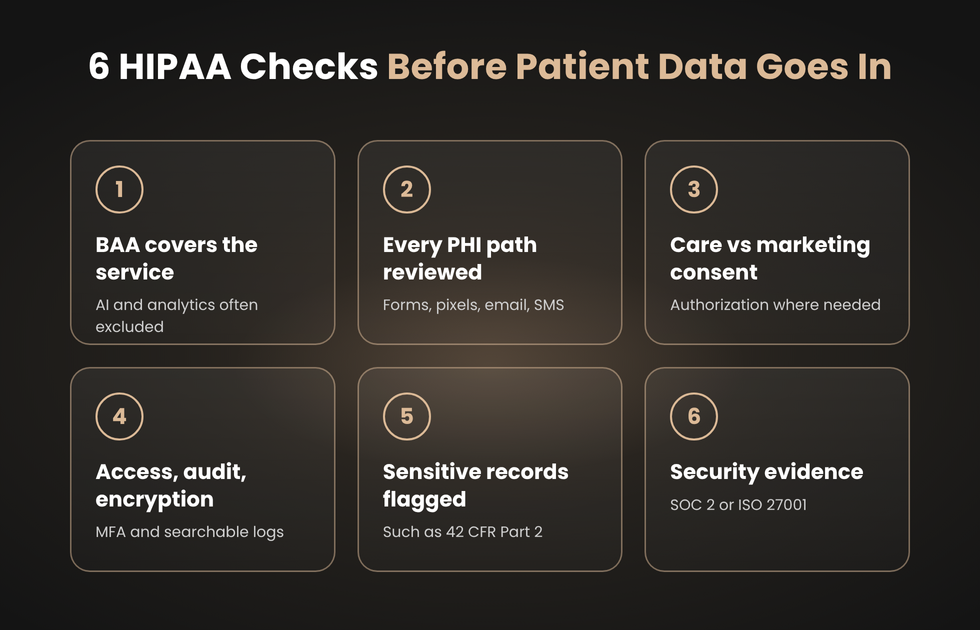
To help prevent any potential data breaches, make sure to check these six points before any patient record goes into a new system:
Get a BAA that names the services you’ll use: HHS guidance states that a cloud provider storing or processing patient data must sign a business associate agreement, even when it can’t view the encrypted data. Vendor agreements are scoped to listed services, so check each one’s exclusions. As an example, HubSpot tells customers not to enter sensitive data into its AI tools, and Salesforce’s BAA restrictions leave out certain Einstein features in Marketing Cloud and Commerce Cloud. Make sure all your workflows can be mapped to explicitly covered services before you sign anything.
Trace every path PHI takes in and out: Web forms, booking widgets, tracking pixels, email, and SMS all move patient data, and each one needs its own review. Tracking pixels on logged-in pages such as patient portals still count as a possible PHI disclosure under HHS guidance, even though a 2024 court ruling struck down the part about public pages. HHS also permits unencrypted email to patients only after you warn them of the risk and they still accept it, and your CRM should clearly record that choice.
Keep care messages separate from marketing: Appointment reminders, refill reminders, and care coordination messages don’t need the patient’s authorization. Promoting a service with patient data generally does, and the HHS marketing guidance uses the example of a hospital telling former patients about a cardiac facility that isn’t part of it. Campaign tools should check each message’s purpose against stored authorizations automatically, because the person building a newsletter list rarely has the Privacy Rule in mind.
Confirm access controls, audit logs, and encryption: The HIPAA compliant CRM features for healthcare that matter most are unique user IDs, multi-factor authentication, role-based access, automatic logoff, encryption in transit and at rest, and searchable audit logs, the same list that drives HIPAA-compliant software development for any custom system. In January 2025, HHS proposed making multi-factor authentication and encryption mandatory, since today’s rule doesn’t strictly require either, so it’s safer to choose or custom-build a CRM that already covers both.
Flag records that need extra protection: Some patient data comes with stricter rules than standard HIPAA protections. Addiction treatment records are the clearest example, since federal rules tightly limit who can see and share them, and those rules have been fully enforced since early 2026. If your CRM can’t tag these records and restrict access to them separately, keep them only in the clinical system instead.
Ask for security evidence, not a badge: A “HIPAA compliant” label on a vendorʼs site isn’t a certification, because HHS doesn’t certify or endorse products. Ask for a SOC 2 Type II report or an ISO 27001 certificate, the breach notification terms, and the list of subprocessors. Knowing where HIPAA and ISO 27001 requirements overlap helps you better understand what each certificate actually is and proves.
Off-the-Shelf vs Custom Healthcare CRM: How to Decide
Whether to buy existing CRM software for healthcare or build a custom one depends on how standard your workflows are and how many systems the CRM has to connect to. The comparison below shows where a packaged CRM for healthcare industry teams and a custom build differ once the system is in daily use.
| Factor | Off-the-shelf healthcare CRM | Custom healthcare CRM |
|---|---|---|
| Cost model | Per-user license. Salesforce Health Cloud lists $350 to $725 per user per month, billed annually | Build cost upfront, then hosting and support, with no per-seat fees |
| Workflow fit | Your process adapts to the vendor’s data model | Built around your intake, referral, and consent rules |
| HIPAA scope | Limited to the services the vendor’s BAA lists | You choose the hosting, and your cloud provider’s BAA covers the infrastructure |
| Integrations | Prebuilt connectors for major EHRs, gaps for niche systems | Built for your exact EHR, practice management, billing, and telehealth stack |
| Ownership | Vendor roadmap, price changes, and lock-in | You own the code, the data model, and the release schedule |
An off-the-shelf CRM for healthcare is usually the right call for a single-location practice with standard workflows, a small team, and a vendor whose agreement covers every feature it plans to use. It’s also the sensible choice for a health system whose EHR already ships a CRM module. You pay more per seat over time, but you launch quickly and don’t have to maintain software of your own.
Custom starts to pay when the patient journey crosses systems a vendor doesn’t connect well, such as an EHR, a separate practice management tool, a billing platform, or a telehealth app. It also makes sense when consent rules are too specific for a fixed vendor model, when per-seat fees grow with every hire, or when you want PHI kept in your own cloud account.
In those cases, custom custom CRM development costs more upfront but can end up costing less over the system’s life, because you stop paying for workarounds. A hybrid setup is common too, with a commercial CRM kept for marketing and custom patient-facing and integration layers built around it.
How Acropolium Builds Healthcare Software
We deliver healthcare software development for clinics, virtual care providers, labs, and medical device makers, and most of that work involves the same problems CRM systems in healthcare run into: patient data spread across systems, EHR integration, and HIPAA controls that have to hold up in daily use. Across 23 years and over 455 delivered projects, our engineers settle the data model and the compliance boundaries before building the end features.
These three projects show how that works in practice:
Bringing a Multi-State Telehealth Platform Up to HIPAA Standards
HIPAA-Compliant Medical App Development. A US virtual care provider operating in multiple states came to us with a platform that several overseas vendors had built without shared specifications. Documentation was thin, technical debt was heavy, and the system lacked core HIPAA safeguards, including PHI encryption, threat modeling, consent management, and fine-grained access control.
Our team audited the platform, documented it, and introduced a formal development lifecycle with change control and compliance checks. Six specialists then refactored the code, encrypted PHI in transit and at rest, added role-based access, consent automation, and HIPAA logging, while also connecting EHR and EMR systems through HL7 FHIR on .NET Core and Azure.
Our six-month engagement cut the provider’s IT budget by 40%, sped up feature delivery by 56%, and raised customer retention by 38%.
Replacing Phone-and-Paper Booking Across a Clinic Network
SaaS Appointment Scheduling Software for a Medical Clinic. Our client here is a US clinic group with 250 to 500 employees that runs an appointment-booking SaaS used by more than 200 providers across primary, urgent, and specialty care. Before the project, scheduling ran manually on phones and paper records, each facility used a separate system, and staff re-entered data because nothing synced with the EHR.
We built a multi-location cloud platform with online booking, SMS and email reminders, a waitlist that fills cancellations, AI triage that suggests the right care level, and two-way EHR and EMR sync. Encryption, role-based access, and detailed audit trails support HIPAA and GDPR requirements.
After 15 months of work by our six specialists, patient no-shows fell by about 30% and average wait times dropped by about 25%.
Moving Dental Records and Treatment Plans to Mobile
Dental Clinic Mobile App Development. Dental Sketch is an internal R&D project our team built to test how a mobile app could replace the desktop software and paper records many dental practices still rely on to this day. The prototype combines electronic patient records, X-ray and diagnostic image storage, treatment planning, and visit analytics in one app that dentists can use during consultations.
It also visualizes expected treatment outcomes, along with alternative plans and their cost and duration, so patients can fully understand what they’re agreeing to. Five specialists built it over seven months on React, Node.js, Laravel, MariaDB, and AWS, with database tuning for large image files and access control around every record.
Where to Start with a Healthcare CRM
Before comparing products or working through a generic “what features should healthcare CRM include” checklist, map the full patient journeys your CRM has to support, the data it will hold, and which features the vendor’s BAA has to explicitly cover. That list usually shows whether an off-the-shelf healthcare provider CRM will do or whether you need one custom-built around your systems.
If your patient data already moves between an EHR, a practice management system, and patient-facing apps, our engineers can review that setup and show you where a custom build pays off and where an existing tool with a few custom layers is enough. Book your free consultation with Acropolium to get that assessment before you commit any budget to licenses or development.