There’s a moment every developer and product team hits: you’ve played with ChatGPT and Claude, you’ve wired up a few API calls, and now someone upstairs wants to know when you’re shipping the AI agent. The demo looks easy. Production is a different story.
This guide is written for people in that gap – developers, technical leads, and founders who need to go from concept to a working, deployable AI agent without spending three months reading academic papers. We’ll cover the architecture, the tooling, the mistakes that cost real teams real time, and the step-by-step process for how to build an AI agent that actually holds up when users get their hands on it.
What is an AI Agent (and Why It Matters)?
An AI agent is not just a chatbot that answers questions. A chatbot responds. An AI agent acts.
More precisely, an AI agent is a smart software system that perceives its environment, reasons over a goal, takes actions – including calling tools, executing code, querying databases, or triggering APIs — and then adapts its behavior based on the results it gets back. It runs in a loop until the task is done or it hits a defined stopping condition.
The distinction matters enormously in practice. A chatbot tells you there’s a scheduling conflict. An agent finds the conflict, checks attendee availability, reschedules the meeting, sends the calendar invites, and flags the one person whose preferences it couldn’t confirm. That’s the gap between reactive and agentic.
Why does this matter right now? Because 93% of IT leaders have already deployed or plan to deploy AI agents within two years. Companies that use AI agents report a 61% boost in employee efficiency.
For example, Danfoss, the global industrial manufacturer, deployed AI agents to handle email-based order processing and automated 80% of transactional decisions, which cut average customer response times from 42 hours to near real-time. Salesforce’s Agentforce platform handled 1.5 million customer interactions through autonomous AI agents without reducing satisfaction scores.
The argument for building your own AI agent is no longer theoretical. Let’s get into how create an AI agent that will really boost performance of your business.
Core Components of a Smart AI Agent
Before you write a single line of code, you need to understand clearly what you’re actually building. Every AI agent tutorial on the internet will eventually run into the same four building blocks.
LLM as the Reasoning Engine
The large language model (LLM) is the brain of your future AI agent or multi-agent system. It interprets instructions, forms plans, decides which tools to use, and generates responses. GPT-4o, Claude 4.6 Sonnet, Gemini 3.1 Pro, and Mistral Large are the current mainstays in production environments.
Choosing the right AI model isn’t just about capability; it’s about latency, cost, and how the model handles tool-calling schemas. For anything requiring nuance over extended reasoning steps, you want a frontier AI model. For high-throughput, repetitive classification tasks, a smaller distilled model will outperform in cost and speed. This is where LLM customization becomes a real engineering decision rather than a nice-to-have.
Memory: Short-term vs Long-term
AI agents are inherently stateless. Every time you call the LLM, it starts fresh. Memory systems are how you overcome that.
Short-term memory is a conversation context window. It holds the recent dialogue, tool results, and reasoning chain for the current session. For sessions exceeding 100 turns, you’ll want a trimming strategy: keep the last 20 messages, summarize older ones, and inject that summary at the top of the context.
Long-term memory lives outside the model. It sits in vector stores (Pinecone, Weaviate, pgvector), relational databases, or key-value stores. When an AI agent needs to remember a user’s preferences from three months ago, or recall the last 500 customer tickets before responding to a new one, that’s long-term memory retrieval.
Many teams underinvest here. If you want your AI agent to feel intelligent rather than amnesiac, long-term memory design is worth the upfront architecture effort.
Tools and Actions
Tools are what transform an LLM from a text generator into an AI agent. A tool is any function the AI agent can call: a web search API, a database query, a code interpreter, a calendar integration, an email sender, a payment processor.
The AI agent decides which tool to use based on its reasoning. The tool executes and returns a result. The agent reasons over that result and decides what to do next. This is how AI agents handle tasks that no single LLM call could complete.
Well-designed tools have clear, unambiguous descriptions, because the AI model reads those descriptions to decide when to use them. Vague tool definitions lead to hallucinated calls. AI connectors between your agent and the systems it needs to reach (CRMs, ERPs, internal APIs) are frequently the most time-consuming part of production AI agent development, and they deserve careful schema design from day one.
The AI Agent Loop (Perceive-Reason-Act)
The AI agent loop is the heartbeat of any agentic system. It goes by many names – ReAct loop, Thought-Action-Observation, the agentic cycle – but the structure is always the same:
Perceive: The AI agent receives a goal or a new piece of information (user input, tool result, environment signal)
Reason: The LLM thinks through what it knows and what it needs to do next
Act: It calls a tool, generates a response, or makes a decision
Observe: It gets the result of that action back
Repeat until the task is complete or a stopping condition is met
Understanding this loop is essential for a good AI agent. Every bug you’ll ever debug in an AI agent will trace back to something going wrong in one of these phases. Perceiving the wrong input, reasoning incorrectly about what tool to use, acting on a stale observation – knowing the loop makes troubleshooting more faster.
Choose Your AI Build Path
The right path depends on your team’s technical depth, your timeline, and how much customization you actually need.
No-Code Platforms (n8n, Dify, Lindy)
If your team doesn’t have strong Python or JavaScript expertise or if you need an internal automation running in days, not weeks – no-code platforms are the good answer.
n8n is an open-source workflow automation tool that added strong agentic AI capabilities in 2026. It’s particularly strong for developers who think in workflow terms and need agent-to-agent orchestration without building custom orchestrators.
Dify gives you a visual interface to build RAG-powered agents with built-in memory and tool support.
Lindy targets non-technical business users who need AI agents that connect to email, calendar, and CRM without code.
The trade-off is real: you gain speed but give up control. When your AI agent needs custom state management, complex branching logic, or enterprise-grade compliance requirements, you’ll hit a ceiling. Many teams use no-code for internal tooling and framework-based approaches for customer-facing AI agents.
Framework-Based (LangChain, CrewAI, OpenAI SDK)
This is where the majority of production AI agent development happens right now. While precise figures for AI agent frameworks are still emerging, McKinzey’s research shows that open-source tools dominate the AI development stack, with most organizations relying on them as the foundation for building systems like AI agents.
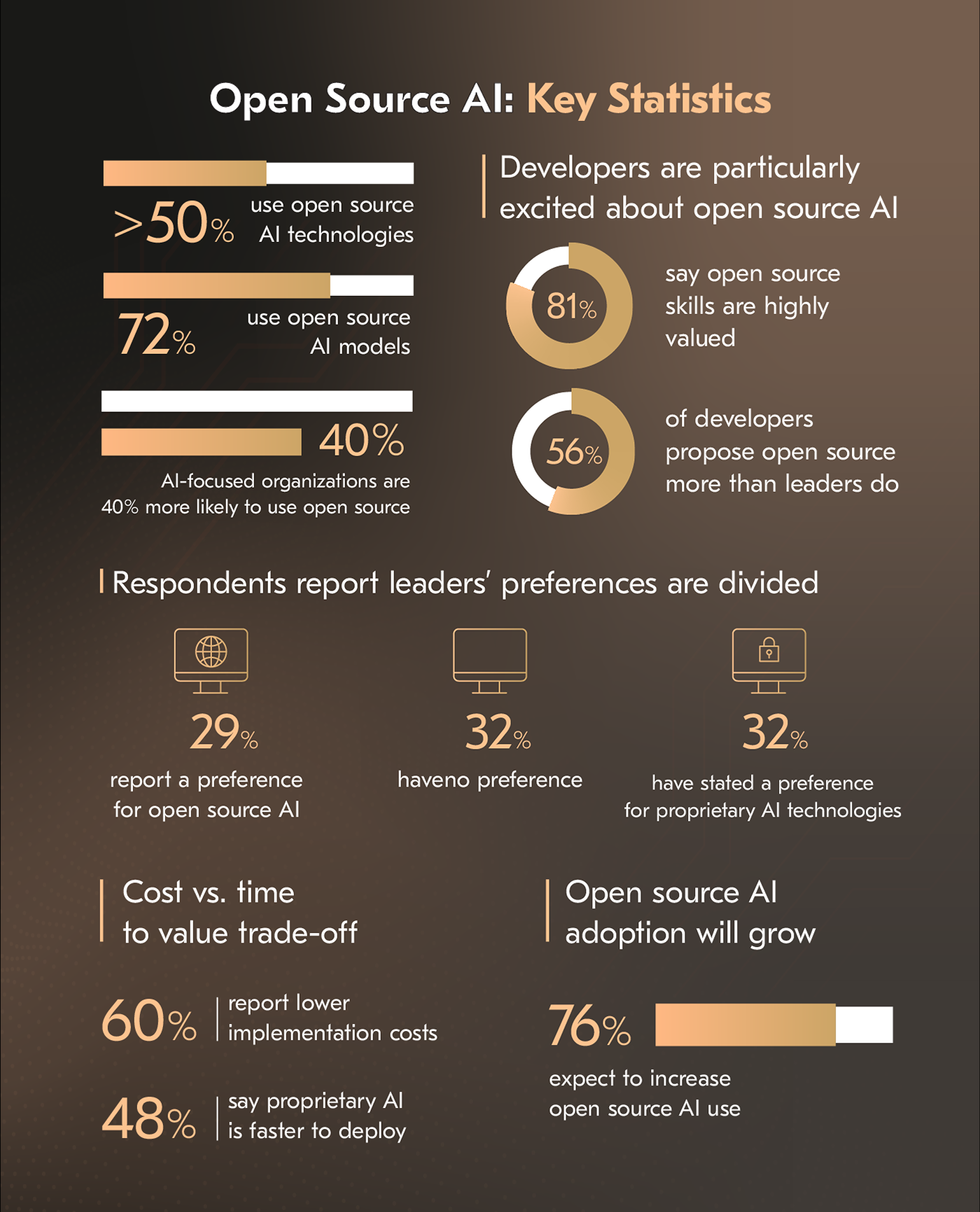 LangChain (specifically LangGraph, its graph-based evolution) has 47 million PyPI downloads and the largest integration ecosystem. It models AI agent workflows as directed graphs with explicit state transitions – powerful for complex, regulated workflows where you need to point at the code and say definitively “the AI agent cannot skip this step.” Best for teams that need deep control and are comfortable with a steeper learning curve.
CrewAI has surged to 44,600 GitHub stars and 450 million monthly workflows processed. It’s built around the metaphor of a “crew” of specialized AI agents that collaborate on tasks – a planner agent delegates to a researcher, which hands off to a writer, which passes to an editor. If your task is naturally multi-role, CrewAI gets you to a working prototype faster than any other framework.
OpenAI Agents SDK is the fastest path to a working GPT-native agent – under 100 lines of code for basic handoff patterns and guardrails. The constraint is obvious: you’re locked to OpenAI’s models and pricing. If that’s acceptable, it’s the lowest-friction starting point.
For teams navigating the AI agents development, the practical guidance is: use OpenAI SDK for fast prototypes, LangGraph for complex stateful production systems, and CrewAI when your problem is inherently multi-agent and role-based.
Custom AI Agent from Scratch
Some teams need none of the above. Financial services firms with strict data residency requirements, healthcare organizations with custom compliance needs, or companies building proprietary agentic infrastructure sometimes need to build at the protocol level.
This means implementing your own tool registry, your own agent loop, your own memory management, and your own orchestration logic. It requires deep expertise in AI software development and significantly more time. But it offers full control over every decision the system makes, full transparency for auditors, and zero framework lock-in.
Reserve this path for cases where the framework ceiling is provably a problem, not a theoretical concern.
How to Build an AI Agent Step by Step
Here’s the actual how to make an AI agent step by step – distilled from what works in production, not in demos.
Step 1: Define the Task and Success Criteria
This sounds obvious and almost nobody does it rigorously enough.
Before touching code, write down: What exactly is an AI agent supposed to accomplish? What does a successful outcome look like, and how will you measure it? What’s the scope – what is an AI agent explicitly not supposed to do?
The most expensive failures in AI agent development guide stories almost always start with a vague task definition. “Help with customer support” is not a task definition. “Resolve Tier-1 billing inquiries by looking up the account, applying the correct policy, and issuing refunds under $50 without human approval” is a task definition.
Success criteria need to be measurable. Resolution rate, accuracy on a golden test set, escalation rate, average task completion time. If you can’t measure it, you can’t improve it – and you can’t tell your stakeholders whether the thing is working.
A good example of what rigorous task definition unlocks: Acropolium built a sophisticated AI-powered AML (anti-money laundering) system for a growing digital bank in Switzerland that needed to scale compliance without scaling headcount. The task was precisely defined – monitor transactions in real time, flag anomalies, auto-generate regulatory reports, and escalate only the cases that genuinely required human review. 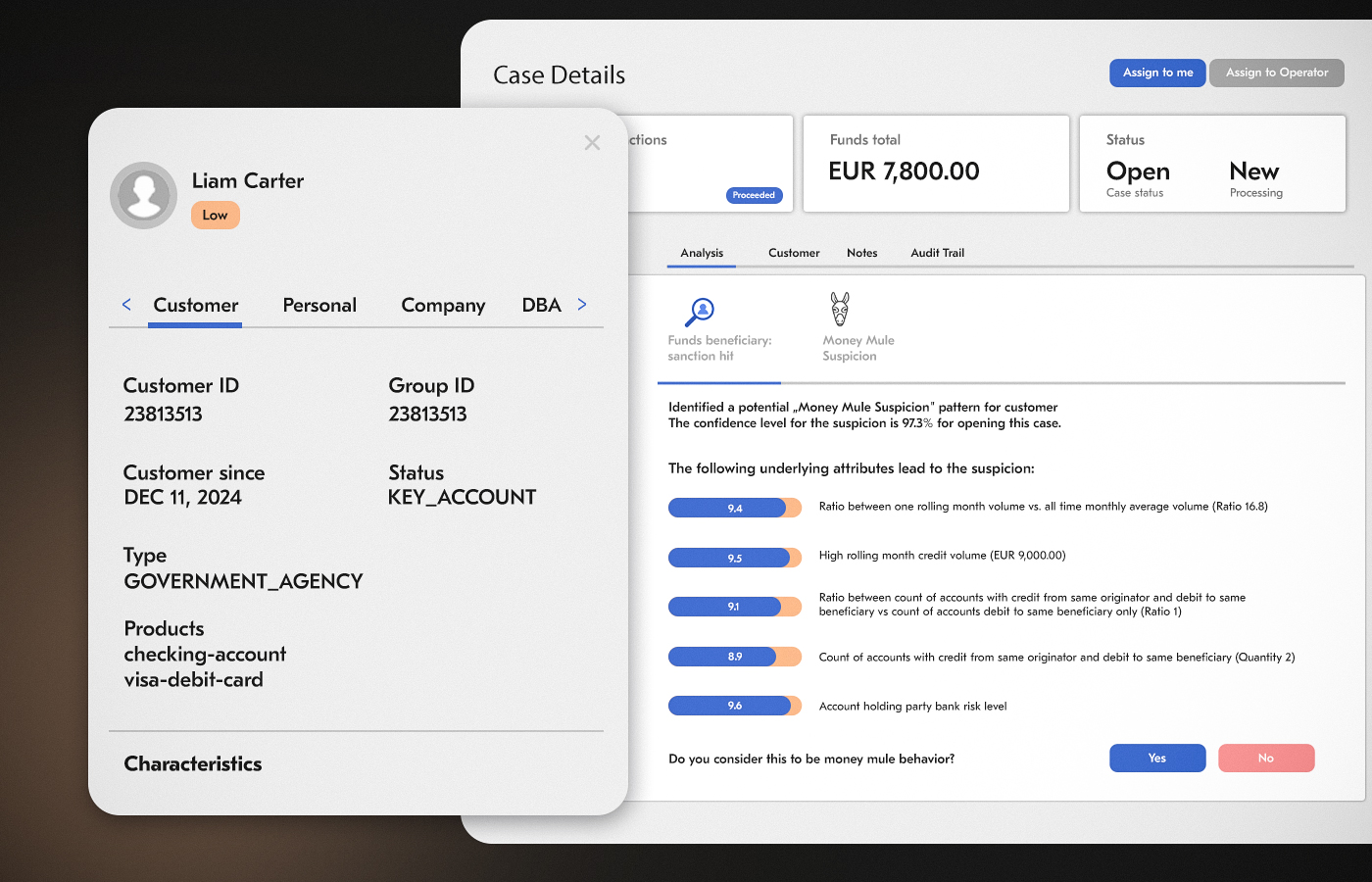
The outcome: a 45% improvement in fraud detection accuracy, a 75% reduction in fraud-related losses, and a 20% reduction in regulatory reporting time. None of that would have been achievable without a task definition specific enough to build measurable success criteria around from day one.
Check AI agent unit economics to also think through the cost model upfront: token costs, API call costs, and human escalation costs at scale.
Step 2: Select the Right LLM
Model selection is a real engineering decision with measurable consequences.
For reasoning-heavy tasks (legal document analysis, financial modeling, complex multi-step planning), frontier models like GPT-4o or Claude 4.6 Sonnet still lead on quality. For high-throughput, lower-complexity tasks (classification, summarization, extraction), smaller models like GPT-4o Mini, Gemini Flash, or Claude Haiku are dramatically cheaper and often fast enough to matter.
Multi-model AI integration – routing different sub-tasks to the model best suited to each – is increasingly the production pattern for serious deployments. Your routing layer decides: this task needs deep reasoning, send it to the frontier model; this task is a classification call, send it to the fast cheap model. The cost and latency improvements are significant.
Evaluate models on your actual task data, not on general benchmarks. A model that wins on MMLU may underperform on your specific domain.
Step 3: Design Tools and Integrations
Write out every external system your AI agent needs to interact with. Then design the tool interface for each one.
A tool interface has three parts:
a name the model will see and use to decide whether to call it,
a description (this is critical – it’s essentially a prompt for the model on when and how to use the tool), and
a parameter schema that defines what inputs the tool expects.
Bad tool description: search_crm 🡪 searches the CRM.
Good tool description: search_crm 🡪 searches the customer CRM to retrieve account status, contact information, open tickets, and billing history for a given customer ID or email address. Use this before responding to any customer-specific inquiry.
The quality of your tool descriptions is one of the highest-leverage points in the entire system. This is also where the design of AI connectors matters: authentication, rate limiting, error handling, and response normalization all need to be built into the connector layer, not left as edge cases.
The integration surface can get complex fast. Acropolium modernized an AI contracting platform for an international legal company that processes thousands of contracts across multiple jurisdictions. The AI agent needed tools to query CRM data, pull from document management systems, cross-reference internal policy databases, and push structured outputs back to case management software – all with the required data consistency across systems using different protocols and schemas.
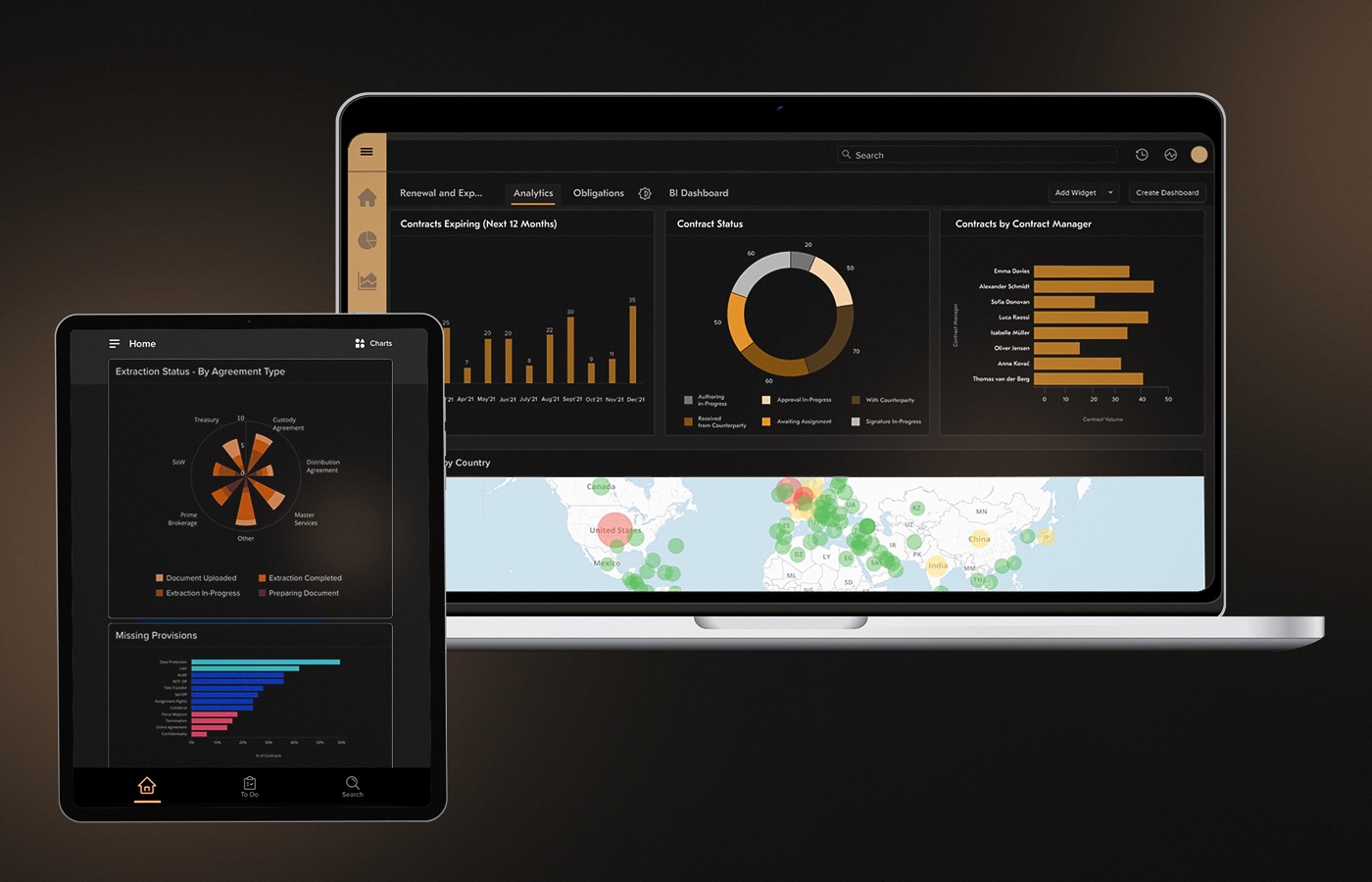
Defining those tool interfaces clearly, and building connector middleware that normalized the outputs, was the work that made the AI agent reliable at scale. The NLP and LLM layer got most of the attention internally; the connector layer is what made it production-ready.
Step 4: Create AI Agent Workflow
Now you’re building an AI agent loop itself.
In LangGraph, this means defining a state graph with nodes for LLM calls and tool executions, and edges that define valid transitions.
In CrewAI, it means defining your AI agents, their roles, their tools, and their tasks.
In the OpenAI SDK, it means defining your AI agent’s instructions, tools, and handoff patterns.
Regardless of the framework, a few AI agent design patterns hold across all of them:
ReAct (Reason + Act) – an AI agent thinks step-by-step before acting. This reduces tool call errors dramatically.
Plan-then-Execute – for complex multi-step tasks, an AI agent first creates a full plan, then executes each step. Reduces mid-stream course changes.
Human-in-the-Loop – for high-stakes actions (sending an email to 10,000 customers, approving a refund above a threshold, posting to a public channel), require human approval before an AI agent proceeds.
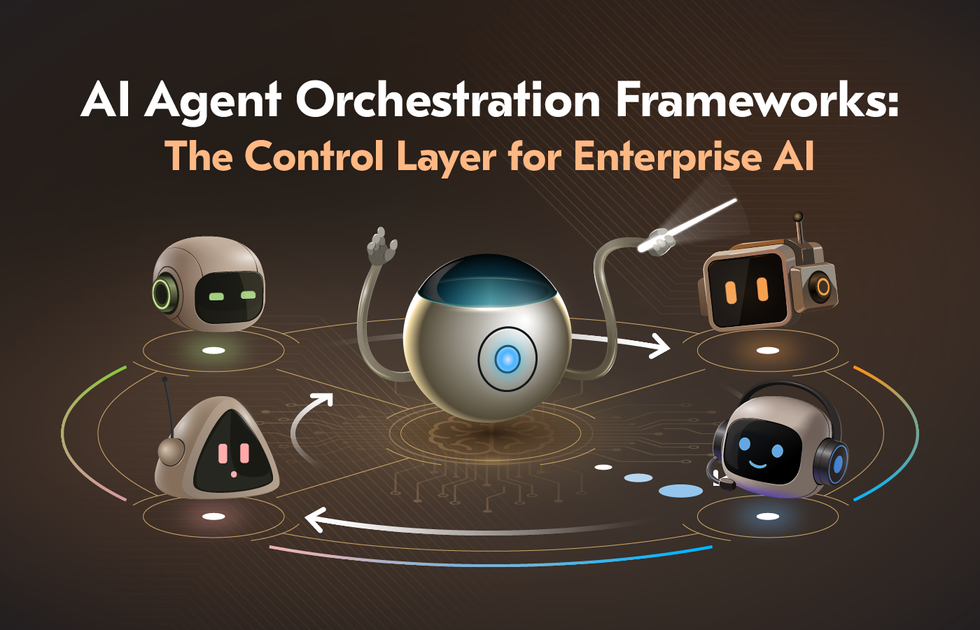
Supervisor-Worker – one orchestrator agent delegates to specialist sub-agents. This is the pattern behind model orchestration architectures where a coordinator routes work to domain-specific AI agents.
Step 5: Add Guardrails and Safety Layers
This is the step where production deployments most often fail.
Guardrails operate at multiple levels such as:
Input guardrails validate and sanitize what comes into an AI agent – blocking injection attacks, flagging out-of-scope requests, filtering toxic input before the model ever sees it.
Output guardrails validate what an AI agent produces before it acts – checking factual claims, ensuring the response stays in scope, flagging low-confidence outputs for human review.
Action guardrails are the most critical. If your AI agent can send emails, write to a database, or trigger payment flows, you need hard constraints on what it can do without human approval.
JPMorgan Chase, an early mover in financial AI agents, built extensive rule-based constraint layers over their LLM reasoning systems. Their Fence guardrail framework uses data-driven methods to proactively identify, test and mitigate such vulnerabilities as hallucinations, topic drift, and prompt injection at the individual use case level, which helps to reinforce the security and reliability of their AI solutions. All because the cost of an unconstrained action in financial services is measured in regulatory fines, not just user dissatisfaction.
Salesforce’s research emphasizes that enterprise AI adoption depends heavily on trust, data quality, and measurable reliability, with organizations seeking clearer ways to evaluate how well AI systems follow instructions and produce dependable outcomes.
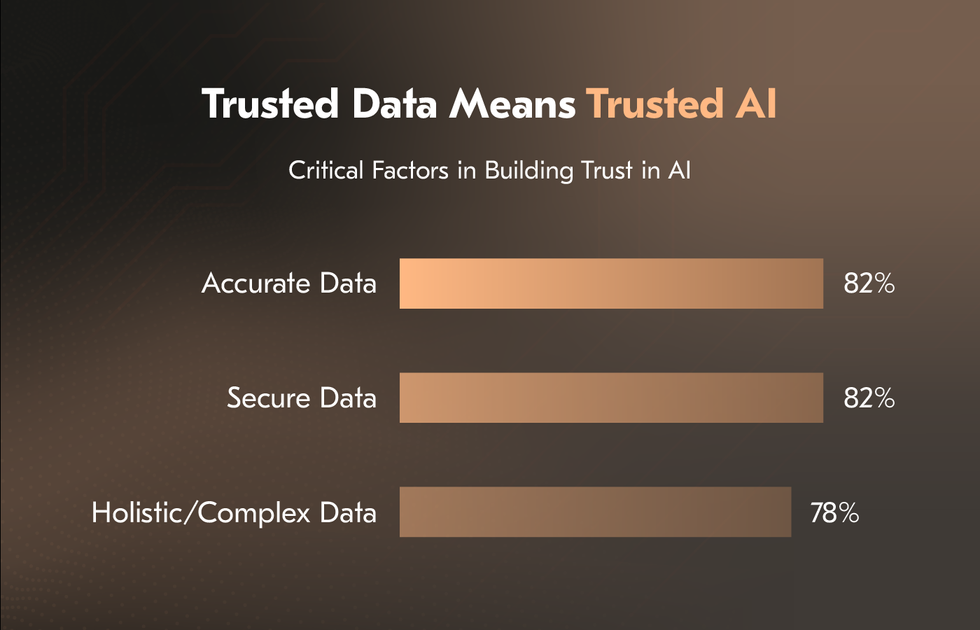
Implement retry logic, fallback behaviors, and explicit escalation paths. When an AI agent doesn’t know what to do, it should say so and escalate correctly, not hallucinate an answer.
Step 6: Test Your AI Agent Like a Product, Not a Prototype
The failure mode of most AI agent development is treating testing as the final step before launch. This is how you get AI agents that work in demos and break for real users.
Unit test your tools independently, before they’re ever called by an AI agent. Know exactly what your CRM connector returns for a missing customer ID before the agent has to handle it.
Build a golden dataset – 50 to 100 representative tasks with expected outputs or expected tool call sequences. Run your AI agent against this dataset on every significant change. Track regression, not just current performance.
Adversarial test intentionally. Try to break your AI agent with ambiguous inputs, malformed requests, contradictory information, and edge cases your system prompt doesn’t explicitly handle. The failures you find in testing are far cheaper than the ones your users find.
Load test if you’re expecting significant volume. AI agent architectures can be surprisingly expensive at scale – parallel tool calls, repeated LLM completions, and complex memory lookups all add up. Know your cost model before you’re surprised by it in production.
This is where generative AI development teams earn their keep — treating AI agents with the same test rigor as any other production software system.
Step 7: Deploy, Monitor, and Iterate
Deployment is not the finish line. For AI agents, deployment is where the real learning begins.
Deploy with comprehensive observability from day one. You need to trace every AI agent run end-to-end: what input it received, which tools it called and in what order, what it returned, how long each step took, and what it cost. Platforms such as LangSmith, Langfuse, and Maxim AI provide structured tracing for agent workflows. Without tracing, debugging complex production failures becomes significantly more difficult and time-consuming.
Set up alerts for anomalous behavior such as tool call rates spiking, cost-per-task exceeding thresholds, failure rates climbing, latency degrading. Treat your AI agent like a microservice – it needs SLOs, runbooks for common failure modes, and an on-call rotation if it’s customer-facing.
Then iterate. A 2026 PwC’s AI Agent Survey found that 79% of U.S. executives are already adopting AI agents in their companies, and among those adopters, 66% report measurable productivity improvements. 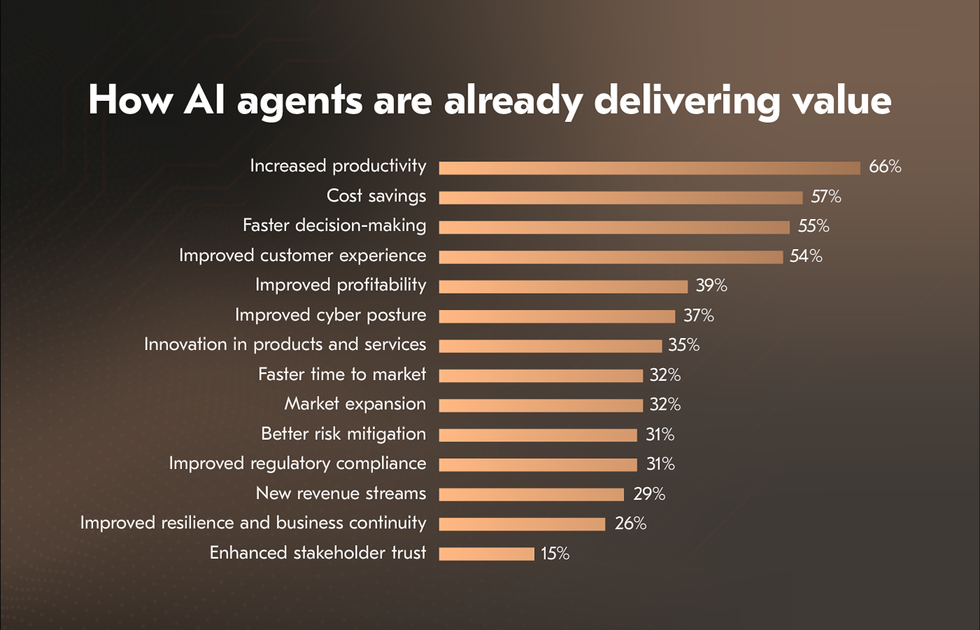
The teams that succeed with AI agent development aren’t the ones with the best initial build – they’re the ones with the tightest feedback loops between production data and prompt/tool improvements.
Multi-Agent Systems: Scaling Beyond One AI Agent
Once your single AI agent is working reliably, the next question is almost always “What can’t one AI Agent do that a system of AI agents could?”
Multi-agent architectures aren’t a solution to every problem – they add coordination complexity, latency, and cost. But they’re the right answer when:
no single AI agent can hold all the context a task requires;
tasks are naturally parallelizable; or
different sub-tasks benefit from different models, tools, or personas.
The most common patterns are Supervisor-Worker (an orchestrator AI agent delegates to specialist sub-agents), Pipeline (AI agents pass work to each other sequentially, each transforming the output), and Peer Collaboration (AI agents with different roles debate, review each other’s work, and converge on a result).
Google Cloud, with support and contributions from more than 50 technology partners like Atlassian, Box, Cohere, Intuit, Langchain, MongoDB, PayPal, Salesforce, SAP, ServiceNow, UKG and Workday; and leading service providers including Accenture, BCG, Capgemini, Cognizant, Deloitte, HCLTech, Infosys, KPMG, McKinsey, PwC, TCS, and Wipro, is building cross-platform multi-agent infrastructure using the Agent2Agent (A2A) protocol – a shared vocabulary that allows AI agents from different organizations to understand intent, verify trust, and coordinate on tasks. 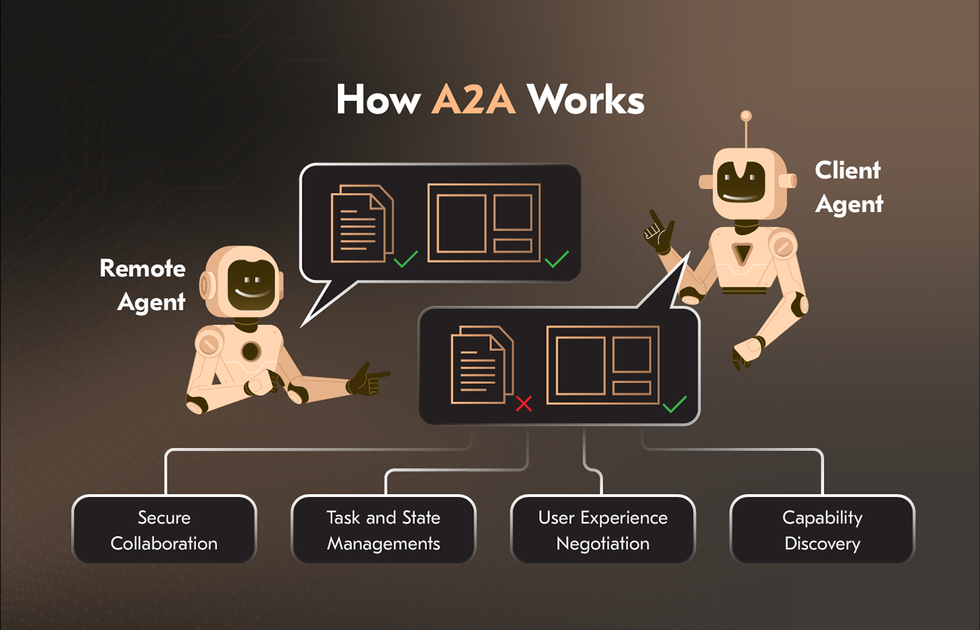
For how to build your own AI agent that talks to other AI agents, the architecture principles are:
define clear contracts between AI agents (what each one accepts as input and guarantees as output),
build independent failure handling in each AI agent, and
instrument inter-agent communication as carefully as you’d instrument any distributed system.
Understanding what separates AI agents from simpler automation approaches is also crucial – see our outlook on AI Agents vs RPA vs Chatbots for a breakdown of when each makes sense. If you’re building a multi-agent system, you’re almost certainly in territory where RPA and chatbots couldn’t get the job done.
Common Mistakes When Building AI Agents
These aren’t hypothetical. They’re the patterns that show up repeatedly across real AI agent best practices post-mortems.
Starting too complex
The urge to build a six-agent orchestrated system before you have a working single-agent loop is almost universal. Resist it. Get one AI agent doing one task reliably before you compound the architecture.
Skipping memory design
Shipping an AI agent without a memory strategy means it can’t learn from past interactions, can’t personalize, and can’t handle multi-session tasks. This becomes an urgent retrofit later, but retrofitting memory is harder than designing it in.
Vague tool descriptions
The AI model reads your tool descriptions the way a new employee reads their job description. If it’s ambiguous, they’ll guess wrong. The fix is always to make the description more specific, not to write a better prompt around it.
No human escalation path
An AI agent that doesn’t know when to give up and hand off to a human is not production-ready. Define every failure condition and what your AI agent should do: retry, fail gracefully, or escalate.
Testing only happy paths
Real users don’t read your system prompt. They’ll send in-scope requests in out-of-scope ways, ask things an AI agent explicitly wasn’t designed for, and provide incomplete information. If you haven’t tested those scenarios, you haven’t tested the agent.
Treating prompt engineering as a substitute for architecture
When you build your own AI agent, you can’t prompt your way out of missing tools, bad memory design, or insufficient guardrails. Prompts are one layer of the system, not the whole system.
Ignoring cost from the start
LLM calls are cheap at 10 requests/day and potentially disqualifying at 100,000. Model the cost of your AI agent at target scale before you commit to the architecture. Almost two-thirds of companies investing in AI agents expect 100%+ ROI – but only if cost is managed.
Conclusion
Building AI agents in 2026 is genuinely within reach for any engineering team that’s willing to approach it with the same discipline they’d bring to any serious software project. The frameworks are mature. The models are capable. The infrastructure for deployment, monitoring, and iteration exists and is improving rapidly.
What separates the teams that ship working AI agents from the teams that demo endlessly is rigor:
rigorous task definition
rigorous tool design
rigorous testing, and
rigorous monitoring.
The technology won’t save a vague requirement. But a well-defined AI agent, built on a sound architecture, with clear guardrails and a tight feedback loop, can do things that genuinely didn’t feel possible two years ago.
How to create an AI agent that works in production is ultimately an engineering problem, not an AI problem. The AI is the reasoning engine. You’re the architect.
If you’re ready to move from concept to deployment, the path is clear. Define the task. Choose the stack. Build the loop. Add the guardrails. Test like a product. Ship and iterate.
Need an experienced team to build it with you? Acropolium has delivered AI agent systems across fintech, healthcare, hospitality, and logistics – from scoped PoCs to multi-agent enterprise platforms. Start with a free consultation and walk away with a realistic picture of what your AI agent needs, what it will cost, and how long it will take.